From M1 to M6: The Decision That Made Me Rethink the Mac
How Apple's shift to custom silicon reshaped the Mac's performance, efficiency, and potential for local LLM development.
I have never been a Mac fan, but the performance of these machines has impressed me lately. Some engineering decisions deserve recognition regardless of how you feel about the brand. Apple’s move from Intel to its own silicon is one of them.
I studied that transition for an assignment in MIT’s Chief Technology Officer Program. The exercise pushed me beyond benchmark scores: what had Apple actually adopted, how much of the product had to change, and what did the customer gain?
The more I looked at it, the more interesting the decision became. Speed matters. But speed delivered within a small budget of power, heat, and noise changes what a computer can be.
The decision in 2020 had years of preparation behind it
In June 2020, Apple announced that the Mac would move from Intel processors to chips of its own design. It had more than a decade of experience building silicon for mobile devices. It also introduced a path for software to follow: Universal 2 binaries could carry code for both architectures, while Rosetta 2 translated existing applications. Apple’s transition announcement.
That software path matters as much as the chip when I look at this as a technology adoption decision. A brilliant processor would have been a poor trade if people could no longer do their work after buying a new computer.
The M1 arrived in November. It brought the CPU, GPU, accelerators, and other functions into a system on a chip, with unified memory in the same package. Apple could design those parts alongside the operating system and the machine that would use them. The M1 introduction.
The MacBook Air made the result tangible: no fan, and up to 18 hours of video playback in Apple’s testing. That battery claim did not mean 18 hours of compiling code. But eliminating the fan was a product change anyone could understand. Silence no longer depended on keeping the workload light. The first Macs with M1.
The software transition took time
The early compatibility problems were real. At launch, Docker explained that Rosetta 2 alone could not make Docker Desktop work on M1; its virtualization stack and dependencies needed additional work. Apple Silicon support reached general availability on April 15, 2021. VS Code also gained stable native builds in version 1.54, several months after the first M1 Macs shipped. Docker’s initial explanation, Docker’s release, VS Code’s native release.
Those are important examples of how far the ecosystem has come. Many early software gaps have closed, including native support for major development tools. Compatibility still depends on the applications, plug-ins, and workloads involved.
As of September 2026, Adobe still documents that legacy Intel-only plug-ins cannot run in Illustrator’s native Apple Silicon mode. Docker also lists slow amd64 emulation and possible failures with certain databases when using its Docker VMM backend. These are specific limitations, rather than a claim that Illustrator or Docker generally fails on a Mac. Adobe’s plug-in guidance, Docker VMM’s known issues.
Rosetta also remains a transition mechanism. Apple says general support continues through macOS 27; starting with macOS 28, its functionality will be limited to certain older, unmaintained games. An Intel-only application that works today may therefore still need a native update. Apple’s current Rosetta guidance.
That makes the adoption story more interesting to me: the hardware arrived first, and the software ecosystem caught up over time. The progress strengthens the case for Apple Silicon, while making the exact dependencies of a developer’s workflow worth checking.
Memory explains part of the result
A discrete GPU typically has its own memory. When an application moves data between that memory and the CPU’s memory, the transfers cost time and energy. Unified memory lets the CPU and GPU work on shared resources, avoiding certain copies. Apple’s image-processing guidance shows developers how to take advantage of this.
The memory interface has not disappeared, and moving data is still work. Nor did every Intel Mac have separate CPU and GPU memory: integrated Intel graphics already shared system memory. Apple’s Metal documentation makes that distinction explicit.
I see Apple Silicon as a combination of decisions: custom cores, integration, memory, specialized accelerators, and software built to use them. Neither the Arm instruction set nor the location of the RAM can explain the whole result alone.
What matters to the user is the work this combination can finish. A video export using dedicated hardware and a code compilation exercise different parts of the machine. One score cannot represent both experiences.
What six generations look like
The first two charts follow the base chips, keeping Pro, Max, and Ultra variants out of the series. Both use Cinebench 2026.1 across all six generations.
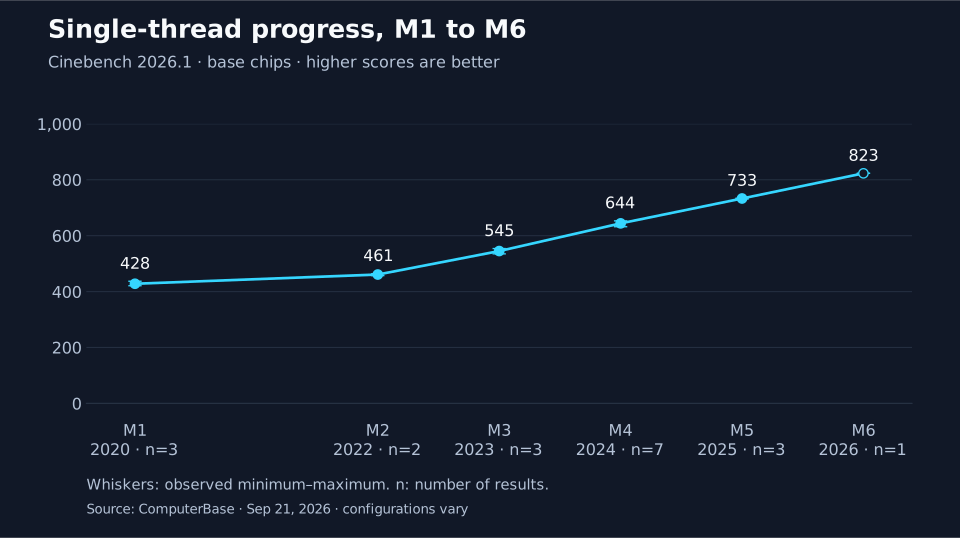
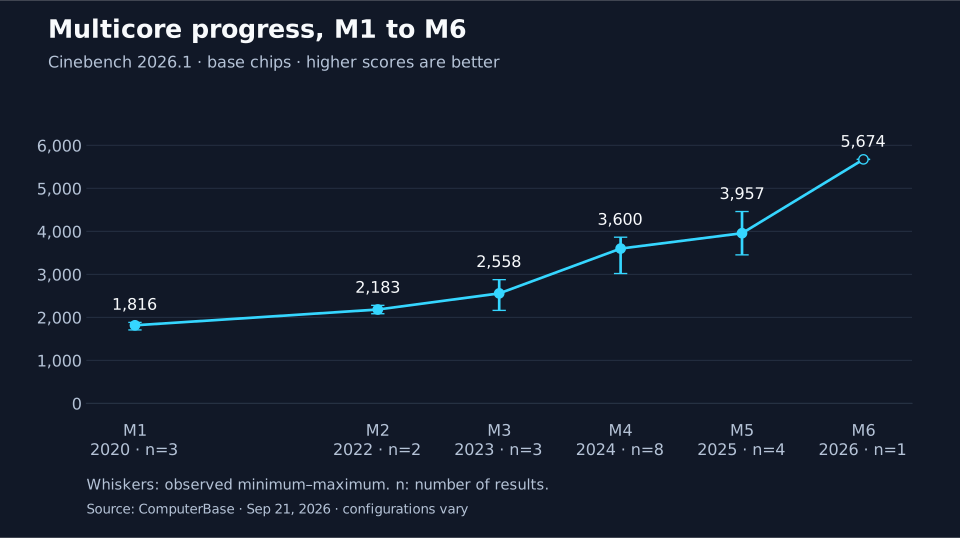
This sample rises from 428 to 823 points in single-thread performance and from 1,816 to 5,674 in multicore: approximately 1.9× and 3.1×, respectively. These are community results across different configurations and cooling systems, with only one M6 observation. They show a trajectory, not an isolated measurement of silicon improvements. ComputerBase’s data.
The resources have changed too: the series goes from eight CPU cores to twelve. Multicore progress combines more cores, better cores, and the conditions of the machine. I would not read it as a promise that every application becomes three times faster.
Apple announced the M6 for the Mac mini on August 25, 2026, with a 2 nm process, a 12-core CPU, and up to 170 GB/s of memory bandwidth. Apple claims up to 20% higher multithreaded performance than M5 and up to 2.4× that of M1. Those are manufacturer figures from a different testing protocol; they need not match Cinebench. Apple’s M6 announcement.
The comparison I care about: work per watt
Efficiency requires measuring performance and power during the same workload. Dividing a Geekbench score by a processor’s advertised TDP gives a ratio, but it does not measure the efficiency of that test.
The following comparisons use Cinebench 2024 and systems tested by Notebookcheck. These scores cannot be compared with Cinebench 2026.1 above. Efficiency uses whole-system power with an external-display setup, rather than an estimated CPU package power.
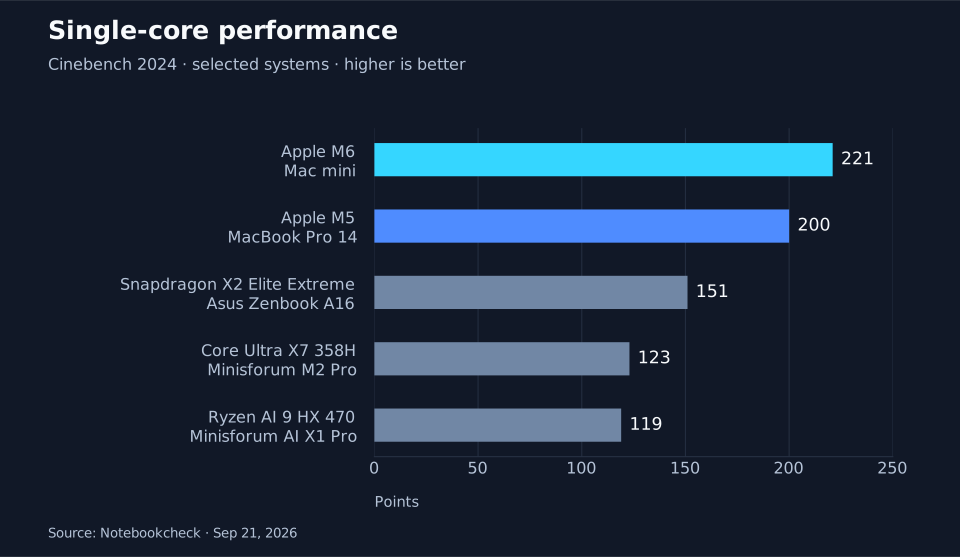
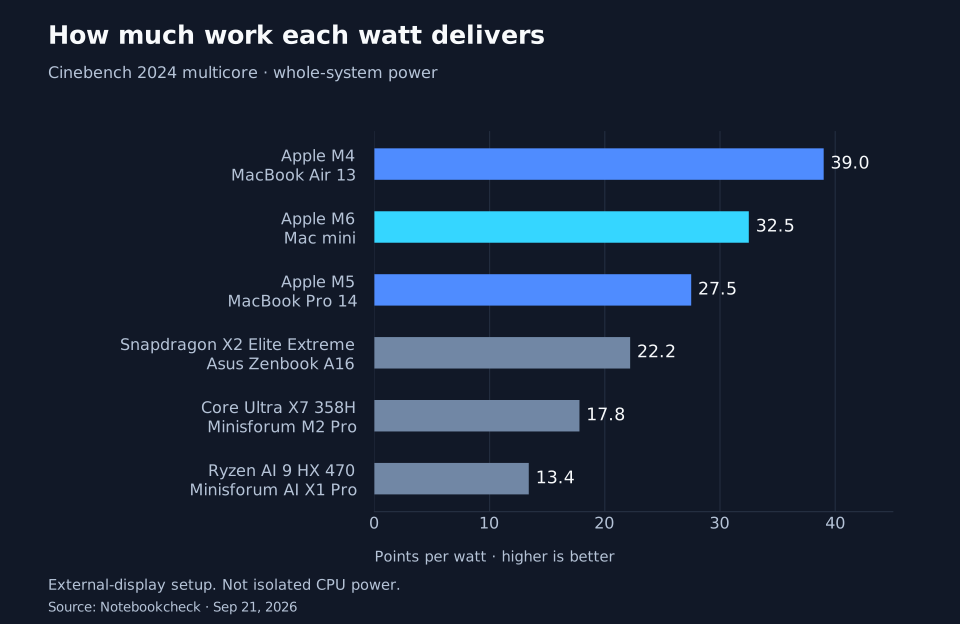
M6 leads this selection in single-core performance and beats the displayed Intel, AMD, and Qualcomm systems in multicore efficiency. Yet the M4 Air delivers more points per watt. The review also finds higher absolute multicore performance in Snapdragon X2 Elite Extreme. Notebookcheck’s measurements.
My reading is that Apple has an exceptional combination of performance and power consumption. Saying that nothing can match it in any task would go further than the evidence. A useful comparison needs a workload, a configuration, and a power limit.
Efficiency also differs from battery life. The display, battery capacity, and the rest of the system all matter. And the M6 in these tests is in a Mac mini: these results do not measure the battery life of an M6 laptop.
Why I would choose a Mac for local LLM development
This is where the architectural decision becomes especially relevant to developers. Today, I consider Apple Silicon Macs the best all-round hardware choice for developers who want to run local LLMs on the same computer they use for everyday work. That is my assessment of the complete development experience: memory capacity, efficiency, and the tools available for building with models.
Unified memory gives the GPU access to the same pool as the CPU. A model is therefore not constrained to a separate graphics card’s VRAM allocation. MLX is designed around that shared access. Memory still has to accommodate the model, its context cache, macOS, and other applications; a model that barely fits can be slow. MLX’s memory architecture, MLX LM’s guidance on large models.
The software makes that useful in a developer’s workflow. MLX LM supports text generation, quantization, and fine-tuning. LM Studio can expose a model through a local API, letting an application call a model running on the same machine. Once the model and runtime are downloaded, its local inference can work offline. That makes it practical to prototype a coding assistant, test a retrieval pipeline against private documents, or compare prompts without sending each inference request to a hosted provider. MLX LM, LM Studio’s local server, offline operation.
There is relevant evidence beyond CPU benchmarks: Tom’s Hardware found that its M4 Max Mac Studio generated tokens faster than the GB10 and Strix Halo systems it tested, while GB10 retained an advantage in prompt processing for Qwen. Local LLM testing.
I would choose the memory configuration around the models I intend to run. The base M6 and a Mac Studio with an Ultra chip have very different capacity limits. My recommendation concerns a personal machine for local inference and application development. CUDA-dependent work, large training runs, or serving many simultaneous users call for a separate hardware comparison. The Cinebench charts above do not measure LLM performance.
Integration has a price
A buyer has to choose an Apple Silicon Mac’s memory capacity up front. The memory is integrated into the package; adding modules later is not an option. It would be unfair to attribute every loss of modularity to M1, though. Many Intel Mac laptops already had soldered components.
Other differences directly affect particular workflows. Apple’s external GPU support requires an Intel Mac. So does installing Windows through Boot Camp. Virtualization is a different option, with its own compatibility conditions.
If an essential tool depends on a particular platform, that constraint can outweigh a performance advantage. Technology adoption has to be evaluated against the work that must keep functioning.
What I take from the decision
Competitors have explored greater integration too. Intel included memory on the package with Lunar Lake in 2024, as its architecture documentation describes. That demonstrates that the approach is not exclusive to Apple. It does not, by itself, establish that Intel made the decision because of M1.
My interpretation of the case is that Apple had a concrete organizational advantage: it could coordinate the chip, development tools, operating system, and finished product. It had also spent years building devices where energy consumption was an everyday constraint.
For a CTO, the interesting question is how much value a different relationship between the components could unlock, and what must be prepared to make that change viable. Sometimes replacing a part is enough. Sometimes the limit lies in how the parts work together.
Apple accepted the cost of changing many of those relationships and built a path for applications to follow. Six generations later, its performance and efficiency show the value of treating hardware and software as one design problem.